Protect your chats, privacy, and data with essential WhatsApp security tips applicable worldwide – stay one step ahead of cyber threats.

Securing your WhatsApp communications.
WhatsApp is one of the most popular messaging platforms globally, connecting billions of users for personal and business communication. With its widespread use comes the risk of cyber threats like hacking, phishing scams, and privacy breaches. Whether you’re using WhatsApp for daily chats, sharing sensitive information, or conducting business, securing your account is crucial. In this post, we’ll cover top tips to enhance your WhatsApp security. These tips will help you outsmart potential hackers. They will also protect you from scams targeting users worldwide.
Why WhatsApp Security Matters
• Personal Privacy: WhatsApp holds sensitive conversations and media.
• Financial Risk: Scammers try to trick you into sharing money or info.
• Identity Protection: Safeguarding against impersonation and data theft is vital.
• Business Use: Companies rely on WhatsApp for communication; security is key.
Top Tips to Secure Your WhatsApp
1. Enable Two-Factor Authentication (2FA): Add an extra layer of protection with WhatsApp’s 2FA feature. Go to Settings > Account > Two-factor authentication.

2. Verify Contacts Carefully: Be cautious when interacting with unknown numbers. Confirm identities before sharing sensitive info.
3. Beware of Phishing Scams: Scammers send fake messages. They pretend to be friends, banks, or authorities. These messages often ask for money or data.
4. Keep WhatsApp Updated: Regular updates include security patches. Update via your app store (Google Play, Apple App Store).
5. Manage Privacy Settings: Control who sees your Last Seen, Profile Photo, Status, and more via Settings > Privacy.
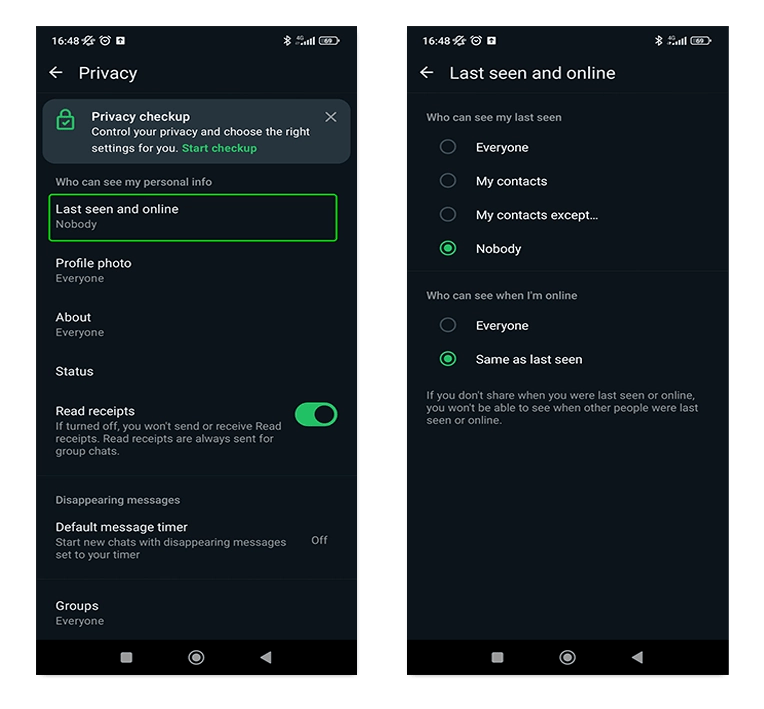
6. Avoid Clicking Suspicious Links: Links from unknown senders lead to phishing sites or malware.
7. Report Suspicious Activity: Use WhatsApp’s reporting feature for scams, harassment, or threats.
8. Use Encrypted Backups: Consider encrypted backups for added chat protection (Settings > Chats > Chat Backup).
9. Protect Your Device: Keep your phone secure with locks, updates, and trusted apps.
10. Be Cautious on WhatsApp Web: Log out when not using WhatsApp Web/Desktop; check active sessions.
Common WhatsApp Threats
• Impersonation Scams: Scammers pretend to be friends/family asking for help/money.
• Fake Offers/Prizes: Messages claiming you’ve won something often aim to trick you.
• Account Verification Scams: Fraudsters ask for codes sent via SMS for hacking attempts.
• Malicious Links: Can lead to phishing or malware when clicked carelessly.
Best Practices for WhatsApp Users
• Think Before Sharing: Sensitive info should be shared cautiously.
• Monitor Account Activity: Check for unusual login notifications.
• *Use Strong Device Security: Protect your phone with passcodes/biometrics.
• Educate Contacts: Share security awareness with friends/family using WhatsApp.
What to Do If Compromised

• Report to WhatsApp: Use reporting options if hacked/scammed.
• Change Settings Quickly: Review/update security if suspect breach.
• Alert Contacts: Inform friends/family if your account was compromised.
Conclusion
Staying safe on WhatsApp requires awareness and proactive steps to protect your account and data. Enable security features like 2FA. Be cautious with unknown contacts and links. Keep your app updated. By doing these, you can significantly reduce risks of hacking and scams. Globally, millions rely on WhatsApp – securing it protects you and your digital interactions.
Stay Vigilant
• Review your WhatsApp security settings today.
• Share these tips with others to spread awareness.
• Stay informed about evolving digital security best practices.
Key Takeaways
• Enable Two-Factor Authentication (2FA) on WhatsApp.
• Be wary of phishing scams and suspicious links.
• Manage your privacy settings proactively.

 JovaPulse Technologies
Leave a comment